1. Home
  2. Modules
  3. GST Return Management

GST Return Filing Software: GSTR-1 Return Management

Prepare GSTR-1 straight from your Prowess ERP sales data. Fetch, classify, validate, review HSN and amendments, then generate portal-ready JSON, with a clear status at every stage.

Return Workflow

From Draft to Filed, Every Stage Tracked

Each return moves through nine stages, so your team always knows what is done and what is next.

1Draft
2Transactions Fetched
3Classified
4Validation Pending
5Validated
6JSON Generated
7Downloaded
8Uploaded
9Filed
Step 1

Return Dashboard

See the whole return before you file it.
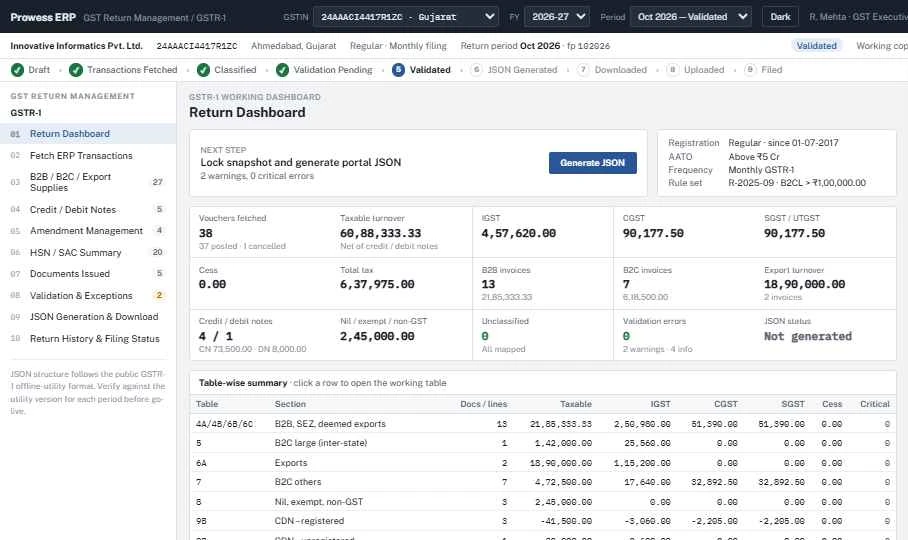
  • Vouchers fetched, posted and cancelled
  • Taxable turnover with IGST, CGST, SGST/UTGST and cess
  • B2B, B2C, export, nil-rated and exempt totals
  • Validation errors and JSON status at a glance
  • Table-wise summary: click a row to open its working table
dashboard · Prowess ERP
Prowess ERP GSTR-1 Return Dashboard with taxable turnover, IGST, CGST, SGST, B2B and B2C invoice counts and table-wise summary
GSTR-1 Return Dashboard: turnover and tax totals, B2B/B2C counts, validation status and a table-wise summary for the period.
Step 2

Fetch ERP Transactions

Pull the period's sales data straight from Prowess ERP, with no re-keying or Excel uploads.
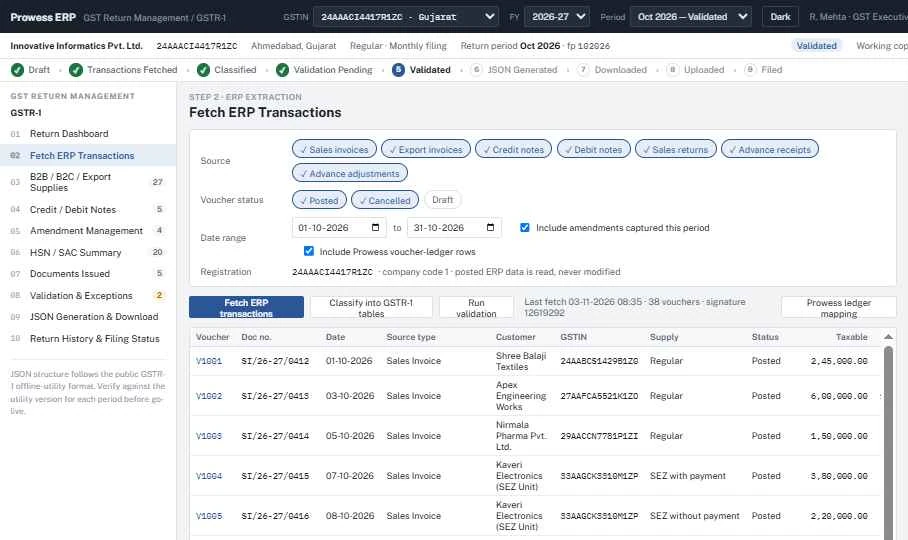
  • Sales invoices, export invoices, credit and debit notes, sales returns, advance receipts and adjustments
  • Choose posted and/or cancelled vouchers
  • Include amendments captured in the period
  • Posted ERP data is read, never modified
  • Classify into GSTR-1 tables and run validation in one click
dashboard · Prowess ERP
Prowess ERP fetching posted sales invoices, credit notes and debit notes into GSTR-1
Fetch ERP Transactions: pull posted invoices, export invoices, credit/debit notes and advances for the period. ERP data is read, never modified.
Step 3

B2B / B2C / Export Supplies

Every outward supply lands in the correct GSTR-1 table automatically.
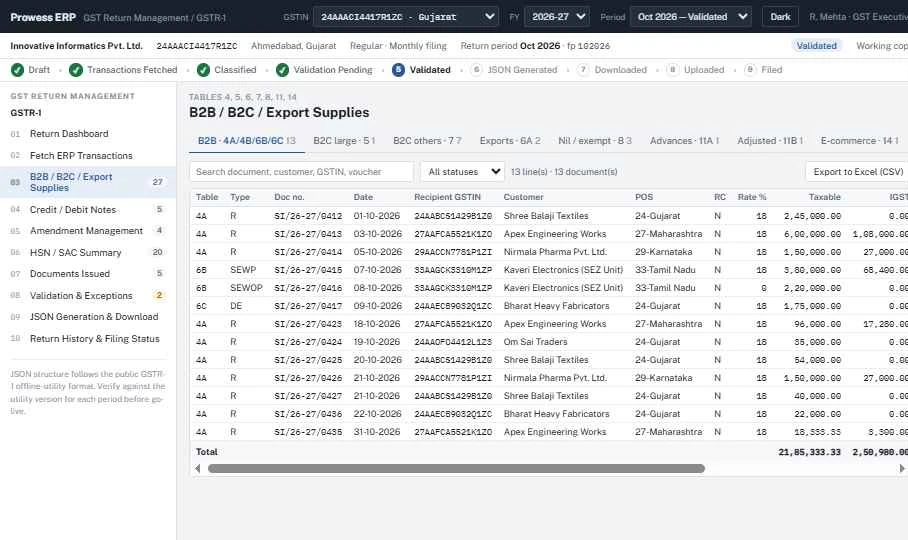
  • Tables 4A/4B/6B/6C, 5, 6A, 7, 8, 11A, 11B and 14
  • SEZ with and without payment, deemed exports, reverse charge
  • Recipient GSTIN, place of supply and rate-wise tax
  • Search, filter by status and export to Excel (CSV)
dashboard · Prowess ERP
Prowess ERP GSTR-1 B2B, B2C and export supplies table with recipient GSTIN, place of supply and tax
B2B / B2C / Export Supplies: tables 4, 5, 6, 7, 8, 11 and 14 with GSTIN, place of supply, rate and tax, exportable to Excel.
Step 4

Credit / Debit Notes

Registered and unregistered notes are reported in the right tables.
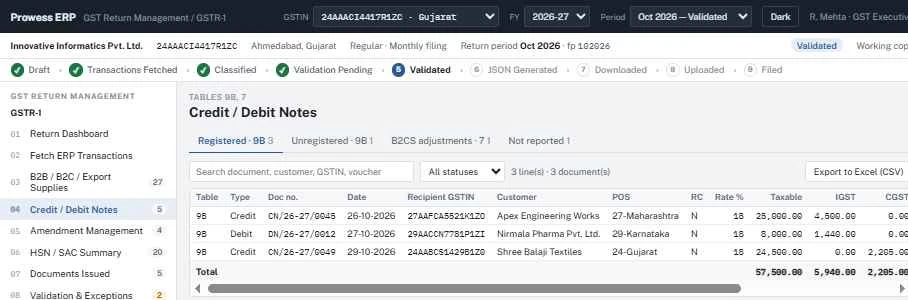
  • Table 9B for registered and unregistered notes
  • B2CS adjustments in Table 7
  • Notes not to be reported are kept separate
  • Linked back to the original invoice
dashboard · Prowess ERP
Prowess ERP GSTR-1 credit and debit notes table 9B
Credit / Debit Notes: registered and unregistered notes (tables 9B and 7) with B2CS adjustments.
Step 5

Amendment Management

Revise earlier returns with a full audit trail.
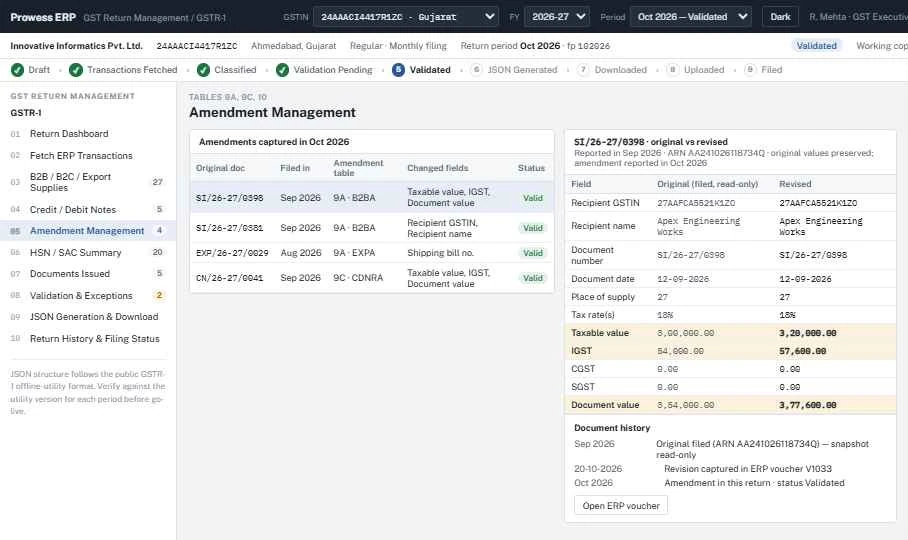
  • Tables 9A (B2BA, EXPA), 9C (CDNRA) and 10
  • Original filed values preserved read-only
  • Changed fields highlighted side by side
  • Document history from original filing to amendment
dashboard · Prowess ERP
Prowess ERP GSTR-1 amendment management comparing original filed values with revised values
Amendment Management: tables 9A, 9C and 10, with original filed values preserved and changed fields highlighted.
Step 6

HSN / SAC Summary

Table 12 is built from your item and service masters.
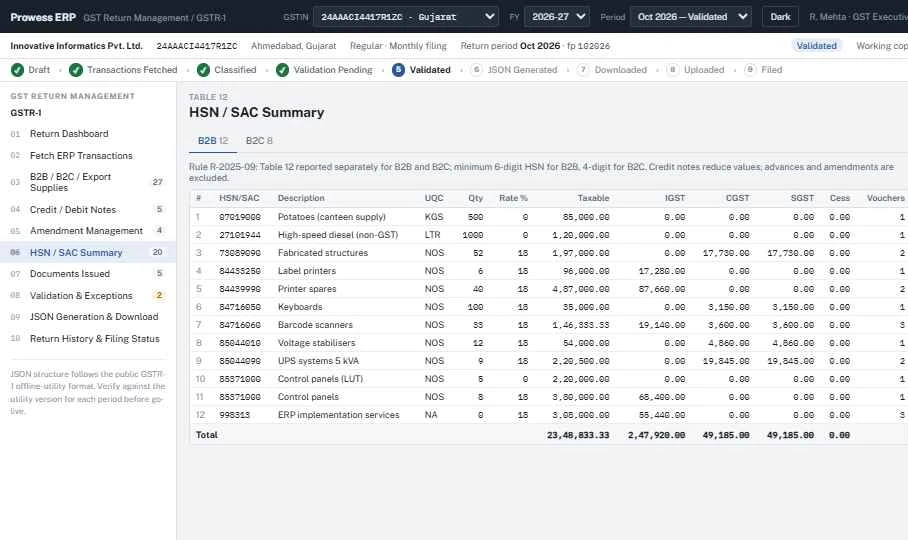
  • Separate B2B and B2C tabs
  • Minimum 6-digit HSN for B2B and 4-digit for B2C
  • UQC, quantity, taxable value, IGST, CGST, SGST and cess
  • Credit notes reduce values; advances and amendments excluded
dashboard · Prowess ERP
Prowess ERP GSTR-1 HSN and SAC summary table 12 for B2B and B2C
HSN / SAC Summary: Table 12 reported separately for B2B and B2C, with quantity, UQC, taxable value and tax.
Step 7

Documents Issued

Table 13 is prepared from your document series automatically.
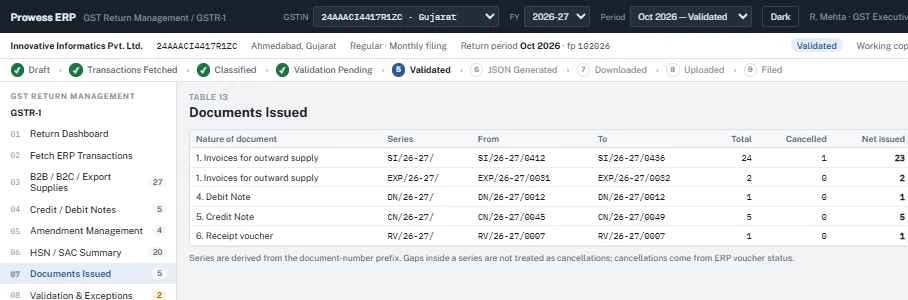
  • Invoices, export invoices, debit notes, credit notes and receipt vouchers
  • Series detected from the document-number prefix
  • Cancellations taken from ERP voucher status
  • Net issued count per series
dashboard · Prowess ERP
Prowess ERP GSTR-1 documents issued table 13 with series, cancelled and net issued
Documents Issued: Table 13 built from document series, with cancellations taken from ERP voucher status.
Step 8

Validation & Exceptions

A rule-based validation engine checks the return before JSON is generated.
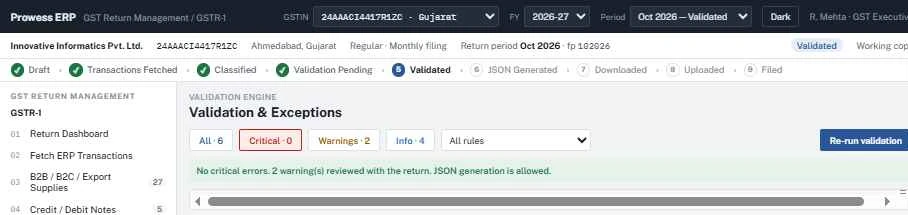
  • Critical errors, warnings and info levels
  • Filter by rule and re-run validation any time
  • JSON generation is blocked while critical errors exist
  • Warnings are reviewed and recorded with the return
dashboard · Prowess ERP
Prowess ERP GSTR-1 validation engine showing critical errors, warnings and info
Validation & Exceptions: critical errors block JSON generation; warnings and info are reviewed with the return.
FAQ

GST Return Filing FAQs

Can Prowess ERP prepare GSTR-1 automatically?

Yes. The GSTR-1 Return Management module fetches posted sales invoices, export invoices, credit/debit notes and advances from Prowess ERP, classifies them into GSTR-1 tables, validates them and generates the return JSON.

How is the GSTR-1 filed on the GST portal?

Prowess ERP generates JSON in the GSTR-1 offline-utility format. You download it, upload it on the GST portal and file the return there, then record the filing status in Prowess ERP. Verify the JSON against the offline-utility version applicable to each period before going live.

Does it support multiple GSTINs?

Yes. You select the GSTIN, financial year and return period at the top of the screen and work on each registration separately.

Does it handle the HSN summary and documents issued tables?

Yes. Table 12 (HSN/SAC summary, with separate B2B and B2C reporting) and Table 13 (documents issued) are prepared automatically from ERP data.

How are amendments handled?

Amendments for tables 9A, 9C and 10 are captured from revised ERP vouchers, with original filed values preserved read-only and changed fields highlighted.

Will the module change my accounting entries?

No. Posted ERP data is read, never modified. The return is prepared from a snapshot that is locked before JSON is generated.

Simplify your monthly GSTR-1

See the GST Return Management module on a live demo.